Works with: everything
Where it is stored
Where your data lives depends on how you started. Either way, it is never stored on our servers.
| How you started | Where it lives | Devices |
|---|---|---|
| Sample | Not stored (example data) | All |
| Entered in the app | Device storage (on Apple devices also synced to your own iCloud; on Android, to your own Google Drive if you turn sharing on) | All |
| Google Sheets link (up to 1.0) | Your own spreadsheet | iPhone · iPad · Mac |
| Portfolios you built (from 1.3.0) | Device storage (mirrored to your own iCloud on Apple devices) | All |
Assets you enter in the app
Accounts, holdings, cash and target weights are stored on the device as JSON, in an app-only area other apps cannot read.
On Apple devices it also syncs to your own iCloud so your iPhone, iPad and Mac see the same ledger. That area belongs to your Apple account and we cannot reach it. A device not signed in to iCloud simply does not sync.
On Android the same happens only if you turn device sharing on — the ledger and any rebalancing in progress are saved to your own Google Drive as two files. It is off by default, and the only permission the app asks for is drive.file, which means it cannot see anything outside the files it created.
Editing on two devices at once loses nothing. Changes to different accounts or holdings are both kept, and you are asked which to keep only when the same holding was changed differently.
| Device | How it is protected |
|---|---|
| iPhone · iPad · Mac | App sandbox plus file protection — unreadable while the device is locked |
| Android | App-private storage — other apps cannot reach it and it is left out of device backups. With device sharing on, also your own Google Drive |
This data is never sent to our servers. With sync on, it goes only to your own iCloud or Google Drive. You can delete it in settings, and deleting the app takes it with it.
Portfolios you built (from 1.3.0)
These are mixes you have not bought, so they are kept separately from your ledger — as files in the same app-only area, with the same file protection.
- Apple devices — mirrored to your own iCloud so iPhone, iPad and Mac see the same list.
- Android — on the device only.
- A share link carries the portfolio after the
#in the address. URL fragments are never sent to a server, so they are neither stored nor logged. - A code someone sends you joins your list only when you press save, and the app re-checks every value first.
Google Sheets link (iPhone · iPad · Mac)
The Android app has no sheet link — it works with the sample or with assets you enter. The one place Android asks for a Google sign-in is turning device sharing on, and that asks for drive.file only (see above).
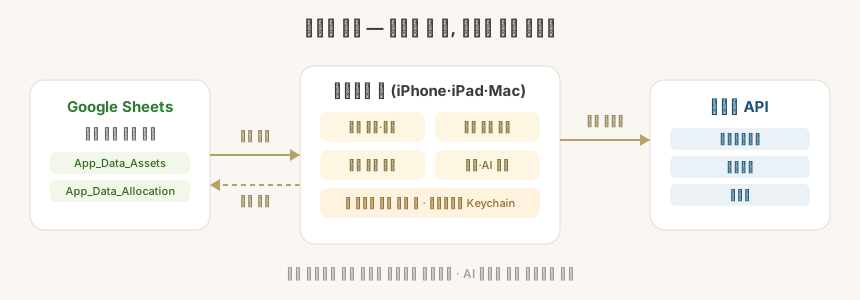
The app reads only the normalized App_Data_* tabs in your spreadsheet.
your original sheet (budget, portfolio, whatever)
  → Google Sheets formulas / IMPORTRANGE
  → App_Data_Assets · App_Data_Allocation · App_Data_Watchlist · App_Data_Events
→ the app reads them and calculates on the device- The
App_Data_*tabs are created in one go from a copy of the template we provide. - The only permission requested is
spreadsheets.readonly— the app never edits or deletes your sheet. - It does not list your Google Drive. You paste the spreadsheet address yourself.
Safeguards
| Safeguard | What it means |
|---|---|
| Google sign-in | spreadsheets.readonly — read only, never write. Removed from the public app in 1.2.0 |
| Credential storage | The public app takes no broker keys from 3.0.1. The 3.0.0 feature that kept Korea Investment & Securities keys only on this device (keychain · Android Keystore) was removed, and 3.0.1 deletes leftover keys on first launch (Broker connection) |
| App lock | Unlock with biometrics (fingerprint, face), or your device lock (PIN, pattern, password) when there are none. It locks again after a trip to the background |
| Local cache protection | Snapshot caches also sit in the app-only area and can be deleted in settings |
| Minimal outbound data | News, prices, financial statements and dividend lookups send the holding identifier only — never quantities, amounts or accounts. ETF search and comparison send the search term and the symbol only, never your amount or weights |
| No asset data to outside AI | Diagnosis, goal suggestions and rebalancing maths are all rule-based logic inside the app. AI is used only to summarize articles for the morning briefing (3.0), and even then only article details and the names of your top holdings go (no quantities or amounts) |
| Masked logs | Tokens and account numbers never appear in logs or on screen |
| Anonymous usage statistics (3.0) | Only screen and feature names and results go, under a random install ID — never amounts, holdings, accounts or anything you typed, and you can turn it off in Settings. Deleted after a year (privacy policy) |
When something fails
- If sheets, news or market indicators fail to load, the app falls back to the last good cache.
- If only some market indicators fail, the ones that arrived are updated and the rest keep their previous values.